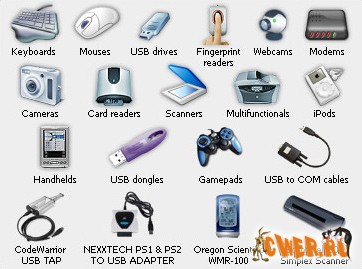
 С помощью USB to Ethernet Connector
вы можете осуществить подключение к любому USB устройству, которое
находится на удаленном компьютере в локальной сети или в сети Internet.
Вы получаете доступ и работаете с ним, как с локальным USB устройством.
После установки USB to Ethernet Connector на вашем и удаленном
компьютере вы можете свободно пользоваться USB устройством, т.к. все
данные с USB порта перенаправляются через TCP\IP сеть на ваш компьютер.
Для выполнения этой функции USB to Ethernet Connector устанавливается
на оба компьютера, которые принимают участие в коммуникационном
процессе. Т.е., USB to Ethernet Connector использует архитектуру
«клиент-сервис» (на стороне сервера физически подключено USB
устройства, в то время как сторона клиента соединена с сервером и
пользуется его услугами), но каждая сторона может быть и «клиентом» и
«сервером» одновременно.USB to Ethernet Connector предоставляет доступ
скорее к USB порту, чем к устройству. Преимущество данного подхода в
том, что Вы можете подключить USB устройство, подсоединиться к нему с
удаленного компьютера, отсоединить устройство и подключить другое, и
оно автоматически появится на стороне клиента. Среди ключевых функций
можно отметить доступ к неограниченному числу USB устройств,
автоподключение к новому присоединенному USB устройству и работа с
виртуальными машинами. Расширенная и надежная архитектура, шифрование
передаваемых данных, широкий спектр поддерживаемых USB устройств и
простота использования делают работу с USB to Ethernet Connector
настоящим удовольствием.
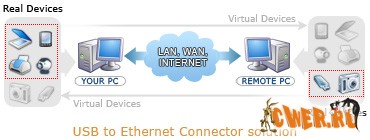 USB to Ethernet Connector
makes it possible to connect to any USB device that is located on the
remote PC on the local network or Internet and use it as if it was
plugged into PC in front of you. You will be able to work with it as
with local USB device and applications working with it will never see
the difference. USB to Ethernet Connector works with USB driver at the
system level. Our application intercepts USB port activity for the
prepared (shared) device and redirects it via TCP/IP network to remote
site, where it is handled appropriately. To be able to achieve such
functionality you must install USB to Ethernet Connector at both
computers that take part in communication process.
USB to Ethernet Connector ensures "hot" Plug-and-Play. It means that
you may plug in the USB device, connect to it from the remote host,
detach the device and plug in other one and it will automatically
appear at the client side. Due to the advanced architecture and
failure-safe working mechanism, wide range of supported USB devices and
standards, simplicity in use and user-friendly interface USB to
Ethernet Connector will be your number one help in working with remote
USB ports and devices.
What's new:
Fixed: the ability to add shared devices into Remote USB devices list when trial version is expired
Fixed: some minor bugs and glitches
Full features list:
Share your USB device with others over local network or Internet using single application
Share an unlimited number of USB devices
USB v1.1 and v2.0 compatible
Auto-connect to new USB devices whenever you plug them in
Shared USB ports are automatically re-configured every time you boot your PC
Fully compatible with Windows 2000/XP/2003/x64/Vista
OHCI, UHCI and EHCI standards are supported
Fully compatible with HyperThreaded and multi-processor systems
Works under virtual machine
Single license allows you to install this application on two computers to provide client-server architecture
Integrate USB to Ethernet technology into your own applications (OEM license only)
Fully commented source code and lots of examples provided (OEM license only)
Лекарство в архиве
Скачать USB to Ethernet Connector 3.0.6.399 (4 МБ):
|