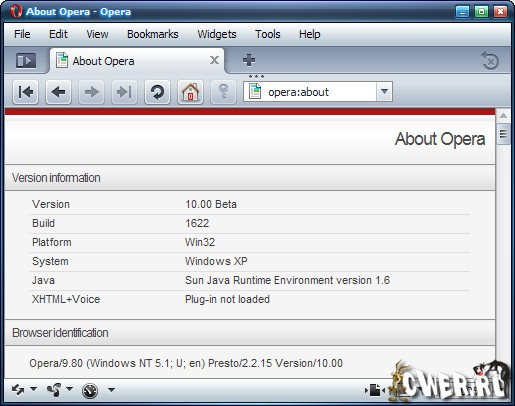
Компания Opera Software обновила свой новый продукт Opera Turbo.
Решение Opera Turbo позволяет сократить объем данных, которые должны
быть загружены, чем значительно увеличивает скорость загрузки
веб-страниц на устройствах пользователей. Кроме того «сжатие» трафика
существенно сокращает расходы конечного пользователя на мобильный
интернет, в случае, если у него нет безлимитного доступа.
Особенность новой разработки заключается в возможности
«интеллектуального» сжатия данных, размер которого зависит от
индивидуальных пропускных способностей канала пользователя. При этом
максимальный размер сжатия просто колоссальный - до 80 процентов для
смартфонов и до 71 процента для компьютеров. Такой эффект достигается
благодаря тому, что запрашиваемые пользователем WEB-страницы, вначале
обрабатываются серверами Opera Software и только после этого поступают
на клиентский браузер. Аналогичная система используется во всем
известном клиенте для мобильных телефонов Opera Mini. Новая технология
поддерживает такие WEB-стандарты как Ajax и Flash - они сжатию не
подвергаются.
Возможности программы:
Cпособ доступа к вашим любимым сайтам с помощью Speed Dial
Защита от мошенничества
BitTorrent клиент
Блокировщик содержимого
Добавление своих поисковых систем
Просмотр миниатюр открытых страниц
Настройки для каждого сайта по-отдельности
Использование виджетов
Новые возможности редактирования текста
Диспетчер загрузки
Навигация по табам
Менеджер паролей
Интегрированный поиск
Блокирование всплывающих окон
Жестикуляция мышью
Функция быстрого перехода вперед
Быстрые настройки с помощью кнопки F12
Голосовое управление
"Горячие клавиши" клавиатуры
Функция "Корзины"
Поддерживает протокол защиты информации SSL, версии 3, и протокол TLS 1.0 и 1.1
256-битное шифрование
Удаление личных данных
Управление cookies
Электронная почта браузера Opera
IRC-чат
Поддержка функции "Drag and drop"
Поддержка смены скинов интерфейса
Мультиязычность
И многие другие возможности
Список изменений:
User Interface
Updated standard skin dialogs (brighter, lighter look with more air)
Fixed several issues with lacking space for translations
Fixed icon height consistency
Added some icons to the mail compose menu and changed some of the icons in the tools menu to colored versions that already exist
Extensive changes due to lightening the pagebar: Icons can now work
on all toolbars, stronger panel color for better differentiation
Corrections to dialog tabs
Adding 16px icons for the main Opera menu (Bookmarks, help, tools, windows)
Changing Speed Dial favicon in standard skin to be more like OS X native skin
Small tweak to the background of standard skin close buttons
Fixed Bug DSK-232147 (Opera replaces commas with dots when I paste
URL to address bar): Stop conversion after first '/' or '?' whatever
comes first
Fixed Bug DSK-251903 ("Go" button not taking new search field into account)
Fixed Bug DSK-253896 (Panel moves when clicking "Unite Services" when "images with text below" is set)
Fixed Bug DSK-255662 (The Go button needs a non-text-looking icon when "images only" is set)
Fixed Bug CORE-18311 (Regex \b is incorrectly matching the point between a letter and underscore)
Fixed Bug CORE-19424 (Regex pattern (a|ab){2} fails to correctly match (can't update IP address at DynDns))
Fixed Bug CORE-19701 (input type=url can no longer match URLs correctly (regexp related))
Fixed Bug CORE-19911 (Regexp of the form /^(b+?|a){1,2}c$/ fails to find match)
Fixed Bug DSK-231216 (Opera crashes, likely after a page on a background tab refreshed itself)
Fixed Bug DSK-247269 (Video at apple.com does not load and page becomes unusable)
Fixed Bug DSK-255591 (Cannot download new .torrent file with turbo enabled.)
Fixed Bug DSK-257538 (Decoding error when writing an html mail with a non-ASCII character)
Mail/Chat
Center the new account wizard for mail
Fixed Bug DSK-203865 (The title in IRC channels always equals the title shown in the app window title bar)
Fixed Bug DSK-256468 (text does not fit completely in a few dialogs when switching to Romanian language)
Fixed Bug DSK-256580 (Can't paste into inline find in mail view)
Opera Unite
Added new dialog for advanced options, adding setting for upload rate
Added new preference for UPnP Service Discovery: opera:config#WebServer|UPnPServiceDiscoveryEnabled
Delete warning no longer shown when dragging a running service, unless dragging to trash
Added warning dialog buttons saying "Delete"/"Cancel" when a user drags a service to the trash
Fixed Bug CORE-21715 (Crash when enabling Unite)
Fixed Bug DSK-256201 (UI problems when running multiple instances of the same Unite Service)
Partial Fix of Bug DSK-256802 (Implement option to toggle visibility on ASD)
Fixed Bug DSK-257279 (When renaming invalid usernames containing a '+', the '+' should be escaped as '%2B')
Fixed Bug DSK-257458 (Wrong message when dragging opened widget): Service deletion warning shown when dragging widgets
Fixed Bug DSK-257609 (Huge properties dialog for unite services)
Fixed Bug DSK-257675 (customized panel toolbar doesn't have the
Unite panel after upgrading to a Unite build): upgrading hotlist panel
selector, adding Unite panel if necessary
Fixed Bug DSK-257770 (service download dialog has an 'Ok' button
that closes the download dialog): service download dialog shouldn't
have an 'Ok' button
Fixed Bug DSK-257799 ("Empty Trash" action should be disabled when trash is empty)
Fixed Bug DSK-257813 ("Open" in the Unite panel should be disabled when no service is focused)
Fixed Bug DSK-257842 (Make it imposible to install a new home service)
Fixed Bug DSK-257852 (Unite: Allow to set port via UI)
Windows
Additional fix for Bug DSK-249688 (Systemwide settings are not read)
Fixed Bug DSK-250578 (Garbled display of tab thumbnail when page uses bitmap fonts)
Fixed Bug DSK-253008 (Wrong name listed for Azureus in BitTorrent Client Selection dialog)
Fixed Bug DSK-257622 (Upgrading single user install from Opera 9.27 to 10.00 1603, mail and profile is not picked up)
Скачать Opera Turbo 10.00 Build 1622 Beta (7,1 МБ):